
AffBulk
A multi-site CMS that builds static sites from templates and AI prompts and deploys them to your own Cloudflare, Bunny or server. Priced as a package of active sites.

I compared three ways to run many websites on the same criteria: price at 1 to 1,000 sites, hosting, bulk work and lock-in. There is no winner here, only which tool fits which setup.
A multi-site CMS that builds static sites from templates and AI prompts and deploys them to your own Cloudflare, Bunny or server. Priced as a package of active sites.
A visual website builder with hosting included. Each site is its own project with its own plan; strong on design, CMS and AI-search controls.
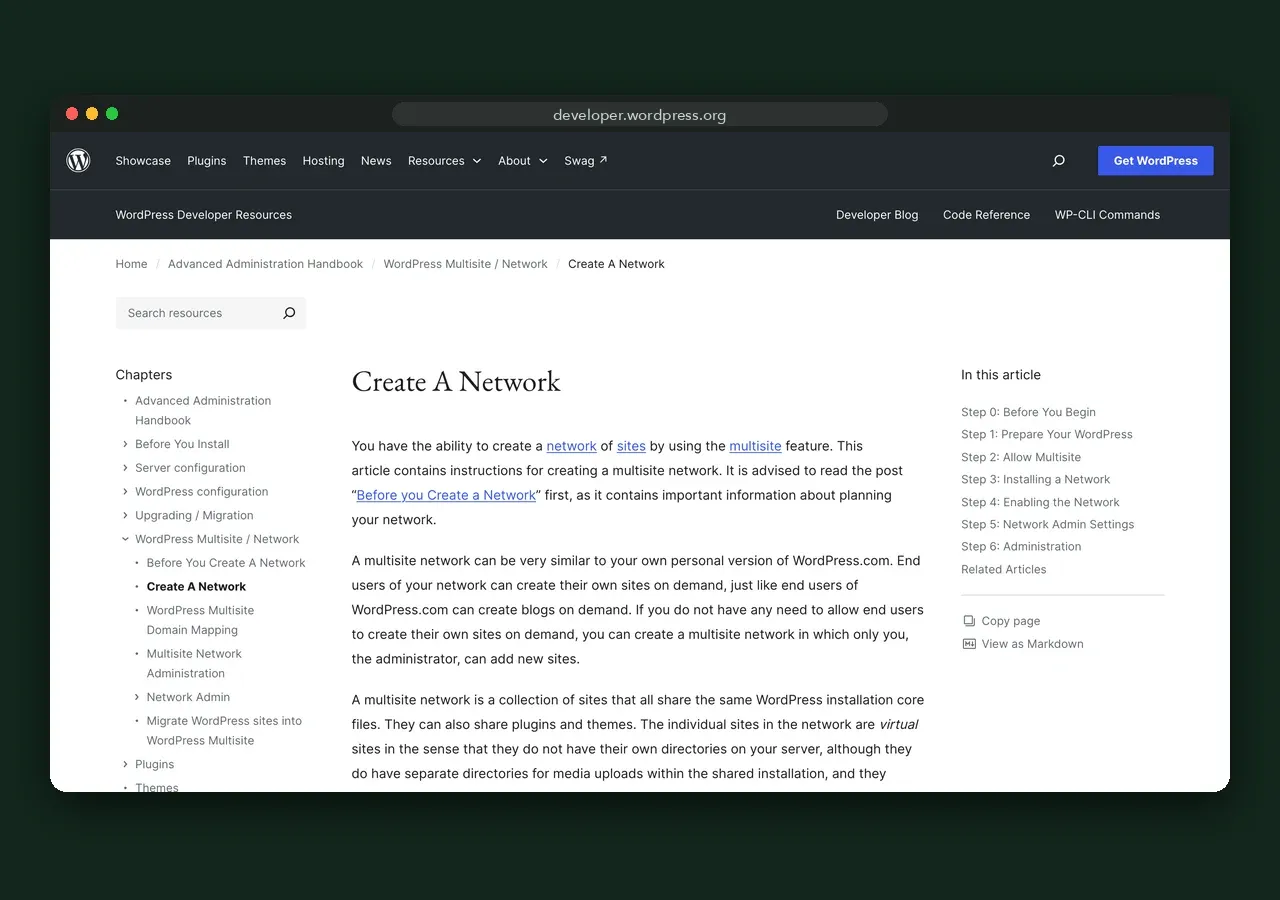
The network mode of WordPress: many sites on one install and one database, with shared users, themes and plugins. Free software; you pay for hosting.
Summary (as of 20 October 2026)
- Webflow suits a few individually designed sites: $15–$25 per site a month billed yearly, hosting included.
- WordPress Multisite suits related sites under one brand that share users and plugins: free software, one hosting plan for the network.
- AffBulk suits networks of 100+ separate content sites managed from one panel: from $1.75 per site a month ($4.99 per site in the 100-site package), deployed to your own CDN.
- The cost lines cross at about 20–33 sites. Below that, Webflow or a single WordPress host costs less than AffBulk’s entry package.
Disclosure: this site is published with support from AffBulk, one of the three tools compared. AffBulk does not edit the text; every price comes from the vendor’s own page, checked 20 October 2026.
I run SEO for projects that span many domains, and the same question keeps coming back: what is the cheapest and least risky way to run ten, a hundred or a thousand sites? These three tools answer it in three different ways. Webflow treats every site as its own designed project. WordPress Multisite puts every site into one shared installation. AffBulk keeps one admin panel but builds every site separately. I put them side by side on the same criteria, using only vendor pages and official documentation, all checked on 20 October 2026.
List prices per month in US dollars, as of 20 October 2026. Webflow prices are site plans billed yearly (monthly billing is $25 for Basic and from $39 for Premium). AffBulk prices are monthly billing (20% less billed yearly). WordPress Multisite hosting examples are from Kinsta.
| Sites | AffBulk | Webflow Basic (yearly) | Webflow Premium (yearly) | WordPress Multisite |
|---|---|---|---|---|
| 10 | $499 (Mini) | $150 | $250 | $0 + hosting, e.g. $50 |
| 100 | $499 (Mini) | $1,500 | $2,500 | $0 + hosting sized by traffic, e.g. $450 |
| 1,000 | $1,799 (Growth) | $15,000 | $25,000 | $0 + enterprise hosting, quote |
What is not in these numbers: domains for all three; CDN and AI API usage for AffBulk; Workspace seats, Localize and extra bandwidth for Webflow; premium plugin licences and admin time for WordPress Multisite. The full table for 1 to 1,000 sites, with every plan and add-on, is on the pricing comparison page.
| Criterion | AffBulk | Webflow | WordPress Multisite |
|---|---|---|---|
| What it is | Multi-site CMS producing static sites | Visual builder with hosting | Network mode of WordPress |
| Pricing model | Package of active sites | Plan per site + Workspace | Free software; you pay hosting |
| Hosting | Your Cloudflare, Bunny, server or ZIP | Webflow only | Any host with Multisite support |
| Shared between sites | Admin panel, templates, presets | Workspace and account | Database, codebase, plugins, users, usually server |
| Design freedom | Templates and blocks; custom layouts from $700 | Full visual control | Themes and page builders |
| Bulk changes across sites | Presets, link variables, bulk deploys | Per site; scriptable via API or MCP | Network-wide plugins and themes; content per site |
| Languages | Built in, automatic hreflang | Localize add-on per locale | Plugins |
| Monitoring | Uptime, index, DMCA checks, Search Console reports | Analyze add-on per site | Plugins or external services |
| AI search controls | Static HTML, automatic schema, llms.txt as custom file | llms.txt, schema and crawler controls on paid plans | Plugins such as Yoast SEO |
| API / MCP | API incl. MCP from Growth or $300 add-on | MCP server on site plans; CMS REST API | REST API in core |
| If you stop paying | Static builds stay on your infrastructure | Hosting ends with the plan; code export on paid Workspace plans | Open source; you keep everything |
| Free way to try | No (demo call) | Free Starter site | Free software |
| Tool | Pros | Cons |
|---|---|---|
| AffBulk | One panel for 100–4,000+ sites; unique code per site; deploys to your own CDN; monitoring built in; from $1.75 per site | 100-site entry package at $499/mo; no free trial, non-refundable; template-based design; static pages only |
| Webflow | Best visual design control; hosting handled for you; free Starter site; llms.txt and schema controls | Cost grows per site; no network-wide editing; Webflow hosting only; Localize and seats extra |
| WordPress Multisite | Free and open source; largest plugin ecosystem; shared users and one update cycle | One database and codebase for every site; needs a WordPress admin; premium plugins often cost more for networks |
AffBulk is a block-based CMS that generates static websites and deploys them in bulk to infrastructure you own. Every site lives in one admin panel and shares templates, page presets, prompts and affiliate link variables, but each build gets its own HTML, CSS class names and asset paths. It deploys to your Cloudflare or Bunny account, your own server or a ZIP, and it monitors uptime, Google indexing and DMCA notices across the network. On 20 October 2026 the admin offered 23 templates. Plans start at $499 a month for 100 sites; there is no free trial, and subscriptions are non-refundable once paid.
Webflow is a visual website builder with hosting, priced per site. The designer gives fine control over layout, the CMS (Premium) holds up to 20,000 items, and paid site plans include robots.txt and llms.txt controls, schema markup support and an MCP server. Each site is a separate project with its own plan: Basic costs $15 a month and Premium from $25 a month billed yearly, with bandwidth tiers up to 2.5 TB. Languages cost extra through Localize ($9 or $29 per locale a month), and team seats sit on a Workspace plan.
WordPress Multisite is a built-in WordPress mode that runs many sites from one installation and one database. The software is free and open source. According to the official documentation, each site gets its own tables inside the shared database, sites share core files, site admins can activate but not install plugins, and network-activating a plugin turns it on everywhere. Setup needs server access and a choice between subdomains and subdirectories. Hosting is the main cost: on Kinsta, Multisite starts at $50 a month for 65,000 visits across the whole network.
These two are the most common choice when a team outgrows a single site, and they pull in opposite directions. Webflow keeps every site separate and hosted for you, at a price per site; WordPress Multisite keeps every site together on one install, at the price of one hosting plan.
| Webflow | WordPress Multisite | |
|---|---|---|
| 10 sites, per month | $150–$250 (yearly billing) | One hosting plan, e.g. $50 |
| 100 sites, per month | $1,500–$2,500 | One plan sized by traffic, e.g. $450 |
| Design | Visual designer per site | Shared themes, per-site settings |
| Who maintains it | Webflow (hosting, updates) | You (core, plugins, server) |
| Users | Workspace seats | Network-wide users, roles per site |
| Leaving | Code export on paid Workspace plans | Full access to files and database |
Deeper head-to-heads: AffBulk vs Webflow, AffBulk vs WordPress Multisite and AffBulk vs Claude. Looking beyond these three tools: Webflow alternatives, WordPress Multisite alternatives and AffBulk alternatives.
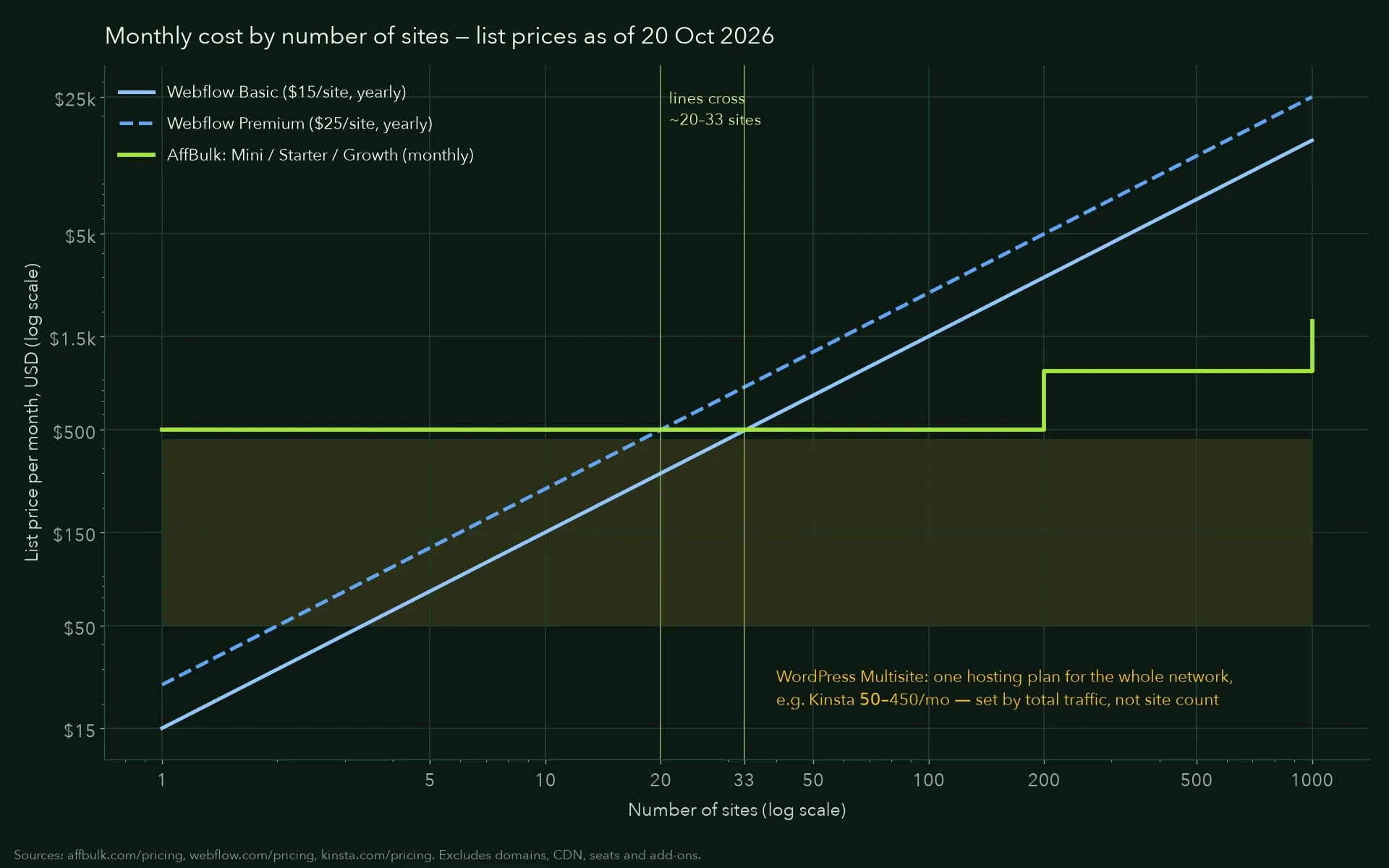
Webflow grows in a straight line, one plan per site. AffBulk moves in steps, one package at a time. WordPress Multisite stays close to the price of one hosting plan, set by total traffic rather than site count.
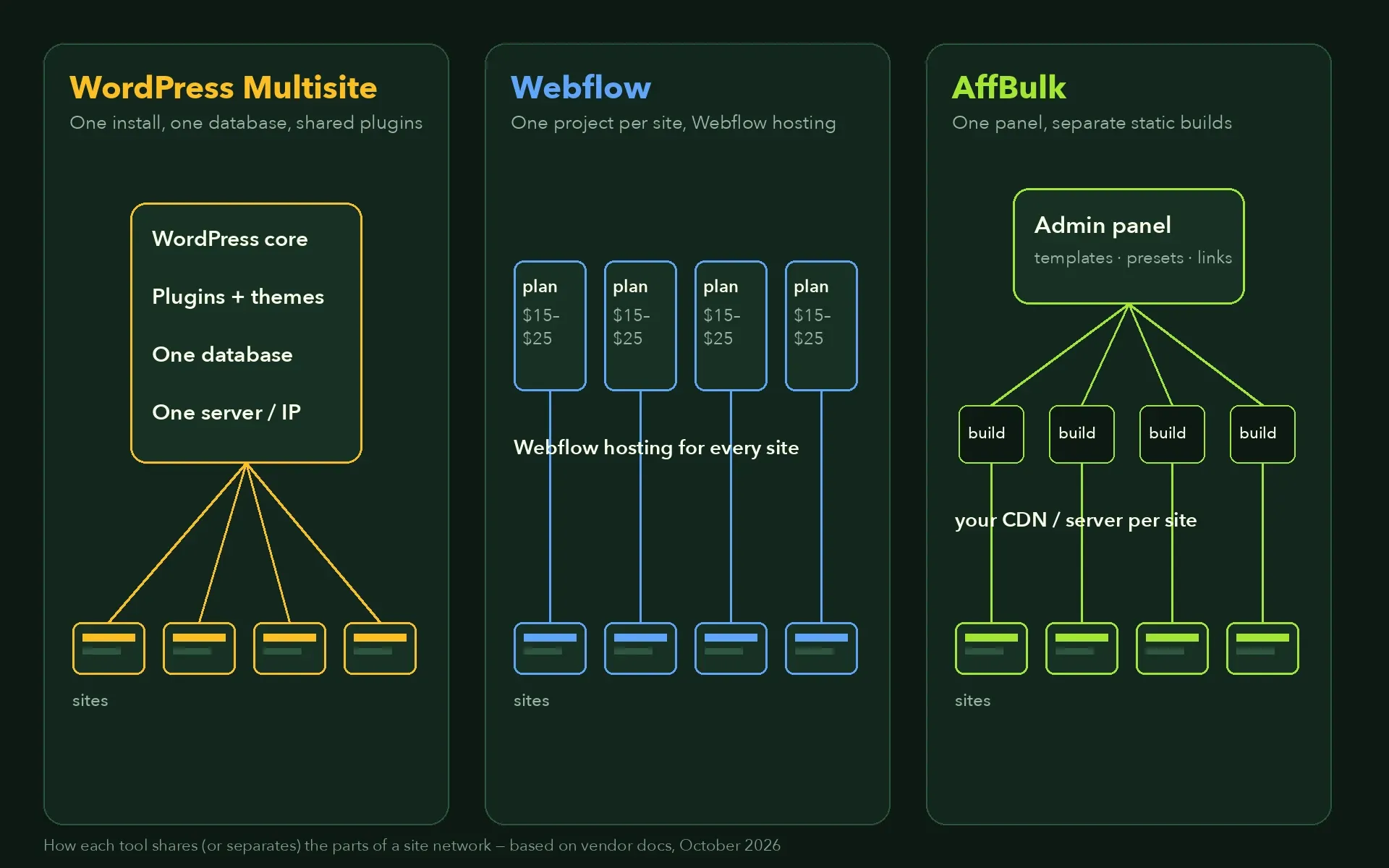
The biggest structural difference is what the sites have in common: one install and database, one vendor’s hosting, or only an admin panel. That decides footprints, risk and how changes reach every site.
#1On list prices as of October 2026, WordPress Multisite is usually cheapest in cash, because one hosting plan serves every site; Kinsta WP 40 costs $450 a month. AffBulk’s Mini plan costs $499 a month for 100 sites. 100 Webflow sites cost $1,500 on Basic or $2,500 on Premium a month, billed yearly.
Everything is shared: one database, one codebase and usually one server. That makes updates easy, but a plugin flaw, an overload or an outage can affect every site in the network. Many premium plugins also charge more for network use.
No. AffBulk builds static sites and deploys them to your own Cloudflare or Bunny account, your own server or a ZIP download. You pay that provider separately, and the sites stay where you deployed them if you stop using AffBulk.
It depends on what the sites share. Related sites under one brand fit WordPress Multisite; a few designed sites fit Webflow; many independent content sites managed in bulk fit AffBulk. This page compares them without ranking, so you can match the tool to your setup.
Webflow charges per site and hosts each one itself, so it suits a few designed sites. WordPress Multisite runs many sites on one install with shared plugins and users, so it suits networks managed by a WordPress admin.
A tool that creates and manages many websites from one place. The three here do it differently: WordPress Multisite runs every site on one shared install, Webflow keeps each site as its own hosted project in one Workspace, and AffBulk keeps all sites in one admin panel and builds each as a separate static site.
Yes. Many teams keep a flagship site on Webflow or WordPress and run a network of smaller sites on a multi-site CMS. Each tool hosts or deploys its own sites, so they do not get in each other’s way.
Webflow, if you want visual design with hosting handled for you. AffBulk is edited in an admin panel with templates and blocks and needs no server work once your CDN is connected. WordPress Multisite needs a WordPress administrator with server access to set up and maintain the network.
Yes, in different ways. AffBulk has an MCP server, included from the Growth plan or as a $300 monthly add-on. Webflow lists an MCP server on its site plans. WordPress has a REST API in core and AI features through plugins. How Claude fits in is covered on the AffBulk vs Claude page.
AffBulk’s static builds stay on your own Cloudflare, Bunny or server. Webflow hosting ends with the plan; code export is available on paid Workspace plans. WordPress is open source, so you keep everything.
AffBulk has languages built in, with automatic hreflang. Webflow needs the Localize add-on: $9 or $29 per locale per month, billed yearly. WordPress Multisite uses plugins or one network site per language.
Senior SEO & Organic Growth Specialist · 12+ years in SEO
I am a Senior SEO & Organic Growth Specialist. My work covers technical SEO and audits, organic growth strategy, keyword research and search intent mapping, site architecture and internal linking, international and local SEO, link building and Google penalty recovery, including YMYL projects. I have worked on sites in healthcare, eCommerce, service businesses, B2B, technology and content publishing, both as a long-term lead and as an auditor and consultant. For this research I priced every tool from its vendor’s own pages, read the official documentation, cited every number with its source and date, and I re-check everything every quarter. Questions or corrections are welcome on LinkedIn.